Offline-First · Zero Cost · Local Business Data

Inventory Management Software with Built-In POS

Receive stock, sell at the counter, and review remaining quantities in one local workspace. Slapsoil supports small-shop inventory and POS offline after setup, with optional Cloud Sync for other devices.

Product evidence

See the workflow in Slapsoil

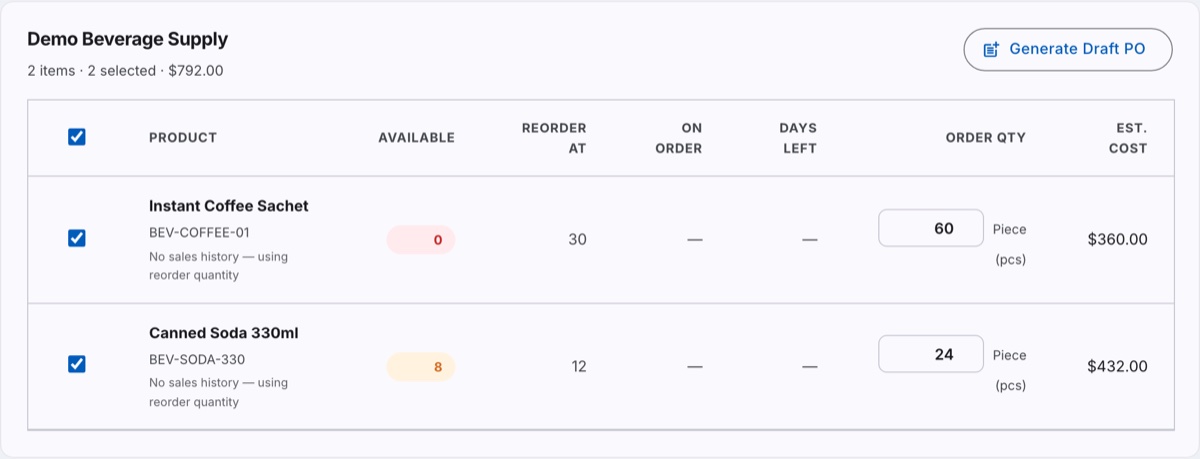
Reorder Assistant grouped under the supplier "Demo Beverage Supply", listing two selected products with available stock, reorder point, order quantity and estimated cost, beside a Generate Draft PO button.
The Reorder Assistant groups low-stock items by their assigned supplier and proposes an order quantity. Both rows here read “No sales history — using reorder quantity”, which is the fallback when an item has no recent sales to forecast from. Generating an order creates an editable draft; Slapsoil does not send it to the supplier or model supplier lead time.
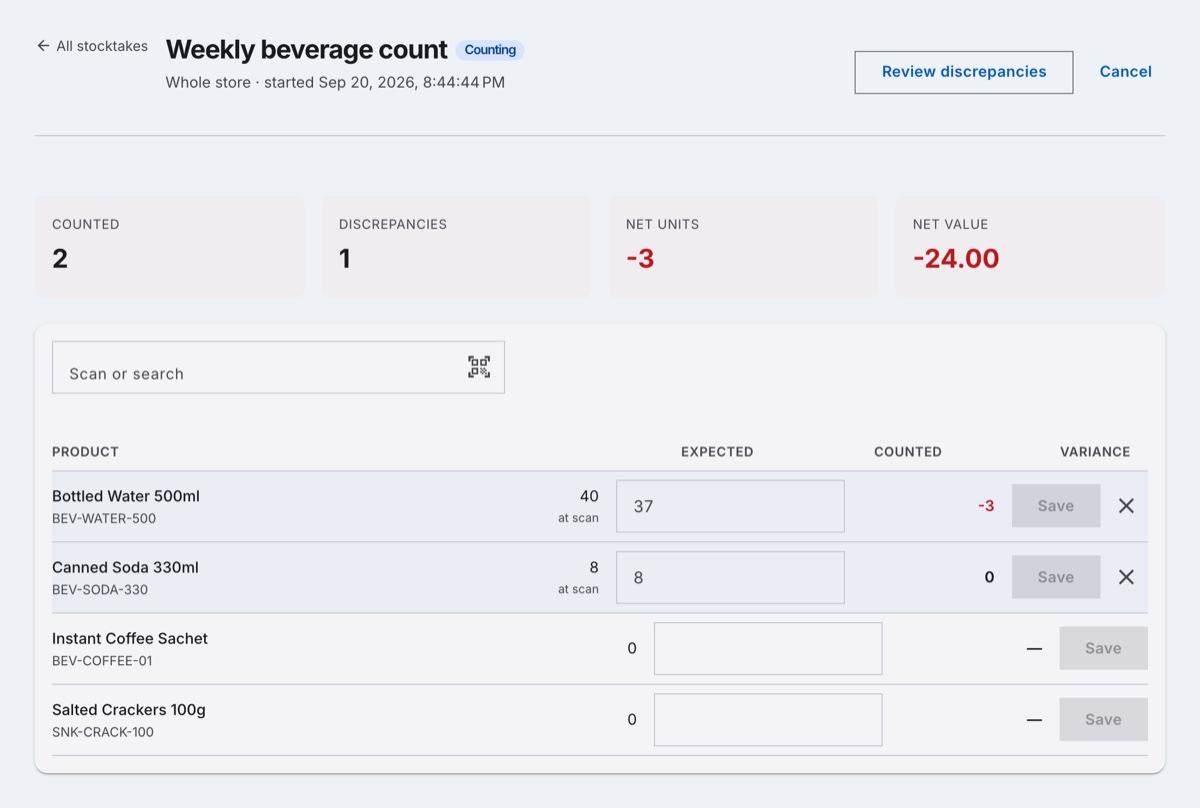
An open stocktake named “Weekly beverage count” showing totals of 2 counted, 1 discrepancy, net −3 units and net value −24.00, above a table comparing expected and counted quantities per product.
An open whole-store count. Each line records the quantity expected at the moment it was scanned, so the −3 variance on Bottled Water is measured against that snapshot rather than against live stock. The till stays open throughout; reconciling applies only the variance, so a sale made during the count is not undone.
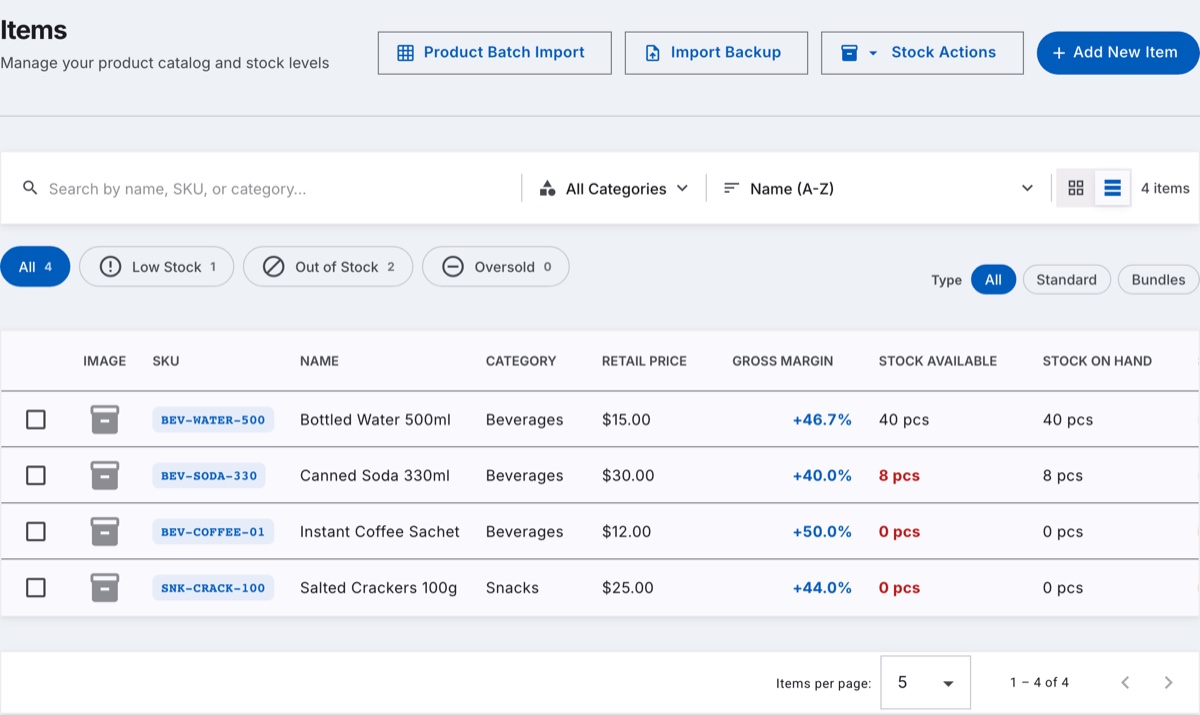
The Items list in table view with stock-health filter chips reading All 4, Low Stock 1, Out of Stock 2 and Oversold 0, above rows showing SKU, name, category, retail price, gross margin and stock available.
The catalogue in table view. The stock-health chips count matching items as you filter, and the sort control offers units sold in the last 30 days alongside name, price and margin. Velocity counts a bundle sale against the bundle itself, not against its component items.
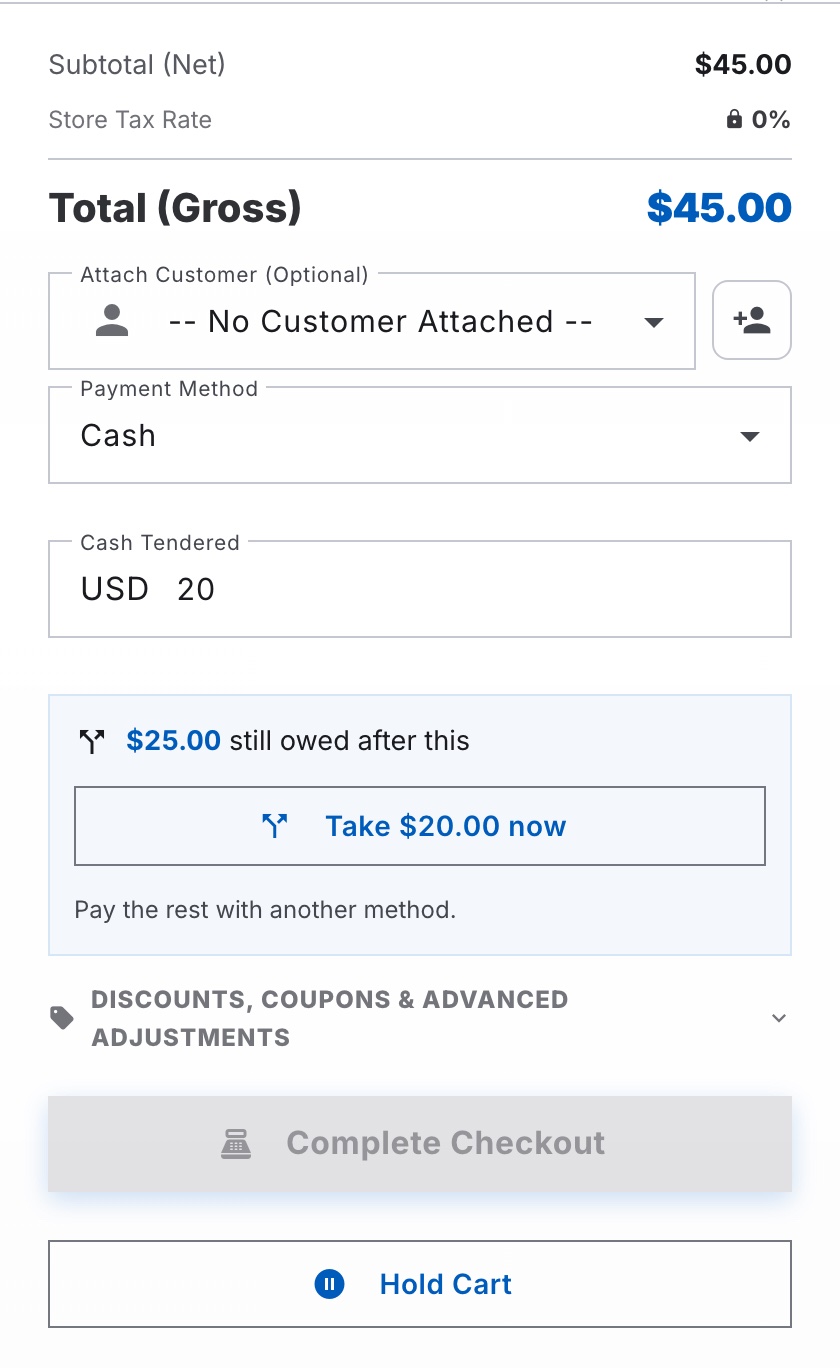
A checkout panel with a gross total of $45.00 and 20 entered as cash tendered, showing a prompt that reads “$25.00 still owed after this” with a “Take $20.00 now” button and the note “Pay the rest with another method”.
Entering less than the balance in the single cash field offers the amount as a partial payment instead of raising an insufficient-funds error. The remainder is settled with another method on the same sale. Slapsoil records card and e-wallet tenders rather than processing them, and change is calculated only from a cash leg.
$0
Forever

No paid app tier, no per-seat pricing, no credit card. Every feature is included at no cost; Cloud Sync is a separate optional add-on.

Local
Offline after setup

Stock and checkout keep working without internet after setup. Cloud setup and synchronization need a connection.

0
Servers required

Catalog, sales, and customer records stay local unless Cloud Sync is enabled. Slapsoil also reports limited aggregate usage telemetry.

New operational workflows

Plan, control, and sell in one workspace

Follow each outcome from its first signal to the record you can review later. The limits that affect offline and multi-device work are included alongside the benefits.

Order and replenish

Move from a stock warning to an editable supplier order.

Review low-stock priorities, use recent sales and reorder settings for suggested quantities, then receive an order in full or in parts.

  1. Prioritize what needs attention

    Review out-of-stock and reorder-point alerts alongside forecast-driven suggestions for the next 7, 14, or 30 days.

  2. Create drafts by supplier

    Select suggestions and create ordinary draft purchase orders grouped by each item's assigned supplier.

  3. Review and receive

    Edit the supplier, dates, quantities, and costs before marking an order sent, then receive all or part of it as stock arrives.

Know before you use it: The assistant does not contact suppliers or model supplier lead time. Products without an assigned supplier cannot become a draft order.

Calculate a reorder point for an item

Count and control

Find stock drift, correct it safely, and understand where units went.

Run whole-store or category counts, attribute internal use, and sort the item list by stock health or 30-day sales velocity.

  1. Count without closing the till

    Scan or search items, compare counted and expected quantities, and reconcile only the variance so sales made during the count are not undone.

  2. Record internal use

    Issue supplies to a recipient or cost centre and review the allocated cost as management reporting, not an accounting journal or COGS entry.

  3. Review item health and movement

    Filter low, out-of-stock, or oversold items and sort by units sold in the last 30 days. Bundle sales remain attributed to the bundle, not its components.

Know before you use it: Stocktake does not lock sales. Cross-device counts require successful Cloud Sync, and a batch-tracked variance is applied to the newest lot.

Understand local data and Cloud Sync

Sell and close

Keep the counter moving, then close the shift with a clear tender record.

Use wholesale price tiers, held carts, split tender, promotions and loyalty, then review an X- or Z-reading for the shift.

  1. Pause and resume a sale

    Hold a cart locally while serving the next customer. Recalling it uses current catalog price and availability; holding a cart does not reserve stock.

  2. Settle with one or more tenders

    Record cash and non-cash payment legs against one sale. Slapsoil records the methods but does not process card or e-wallet payments, and change comes only from cash.

  3. Reward, promote, and close

    Apply eligible promotions or loyalty tender offline, then print an unstored X-reading or have an admin freeze the Z-reading when closing the shift.

Know before you use it: Held carts stay on one device and are not backed up. Offline promotion limits are best-effort, and concurrent loyalty redemption can require balance reconciliation. Readings do not establish tax or legal compliance.

Review checkout behavior during outages
The Complete Platform

Receive stock, sell, and review what remains

Start with the daily shop workflow, then add the features your stock needs.

Product Catalog & Stock Levels

Track every item with SKUs, barcodes, categories, units of measure, and tiered wholesale pricing — with live stock counts on every record.

Built-In Point of Sale

Choose products or scan barcodes, review quantities and prices, and complete checkout. A completed sale updates stock in the same workspace. Payment methods are recorded; Slapsoil does not process card payments.

True Offline-First Architecture

Everyday checkout, stock management and local reports run from browser storage after setup. Initial loading, production registration, and cloud operations require internet.

Inbound & Outbound Movements

Log receiving, fulfillment, and manual stock adjustments with a full movement history behind every quantity change.

Batch & Expiry Tracking

Track stock batches and expiry dates. FIFO depletion does not mean earliest-expiry-first allocation; review expiring batches when deciding what to sell or remove.

Supplier Management

Keep supplier contacts and link them to the items they provide for faster reordering when stock runs low.

Team Roles & Audit Trail

Use the two supported roles, Admin and Staff / Employee, and review the audit trail. There is no custom permission matrix.

Reporting & Sales Forecasting

Sales statistics, cash drawer reconciliation, product movement velocity, and demand projections from your own history.

Customer Credit and Repayments

Assign credit sales to a customer and record repayments against the balance. Review the customer ledger before extending more credit.

Purchase Orders and Receiving

Draft a supplier purchase order, then receive all or part of the order as stock arrives. Review what remains outstanding before placing another order.

Returns and Stock Review

Record returns with the appropriate condition and disposition, then review remaining stock and transaction history before restocking.

Standalone Spreadsheets

Plan and calculate in spreadsheets on this device after setup. Each spreadsheet does not sync through Cloud Sync, stays separate from stock and sales, and is included in workspace backup exports.

Comparing cost rather than capability? See exactly what is and is not included in free inventory management software — no item caps, no seat limits, and no paid tier to upgrade to in the app itself.

Comparisons

How Slapsoil compares to other tools

Side-by-side breakdowns on pricing, offline support, data ownership, and built-in point of sale.

FAQ

Common questions

What is inventory management software?

Inventory management software tracks what stock you hold, what moves in and out, and what it is worth. Slapsoil combines that with a point-of-sale system, so sales automatically decrement stock without a second tool or a manual reconciliation step.

Does Slapsoil really work without an internet connection?

Yes. Slapsoil stores all data locally in your browser using IndexedDB and runs as an installable Progressive Web App. Once loaded, checkout, stock updates, and reporting all work with no connection at all.

Does it replace a separate POS system?

Yes. The point of sale is built into the same system as the catalog, so a completed sale decrements stock directly — there is no export, no nightly sync, and no second tool to reconcile against at the end of the day.

What does inventory management software cost?

Commercial platforms are typically billed per month and per seat, and free tiers usually cap items, users, or locations. The Slapsoil app is $0 with no paid tier above it and no caps — see the free inventory management software page for a full breakdown of what that does and does not include.

Where is my inventory data stored?

In the browser database on your device by default. Optional Cloud Sync sends synchronized records to the hosted service. Keep encrypted exports for backup, including local-only records.

Can Slapsoil handle multiple staff members?

Yes. You can create team accounts with role-based permissions, and every action is recorded in the audit trail so you can see who changed what and when.

What kinds of businesses is it built for?

Small and medium retail and food-service operations — bars, cafes, food trucks, and neighborhood storefronts. See the industry pages below for how it fits each one.

Set up your shop inventory and POS